-
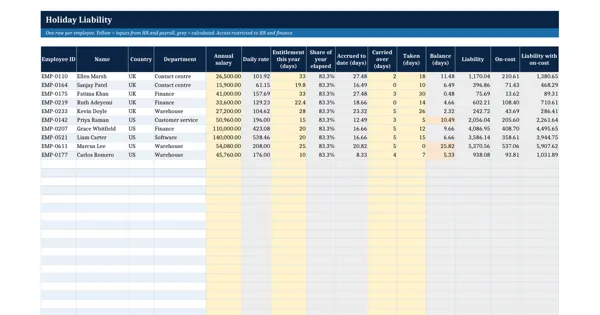 Excel workbook preview
Leave, Absence and Time Tracking
Accrued Holiday Liability Calculator
3 downloads per free account, no card needed.
Who this is for
An HR or payroll lead asked by the finance team for the holiday pay liability at month or year end, split by department and currency.
What is inside
- 10 sample employees in the UK and the US with salary, entitlement, carried over and taken
- Accrued days = entitlement x share of the leave year elapsed at the valuation date
- Liability = balance x daily rate, plus an on-cost rate per country
- Negative balances turn red; balances above half the entitlement turn amber
- Summary by country and department, with GBP and USD totals kept apart
- Settings sheet: valuation date, leave year start, working days and on-cost rates
How to use it: Set the valuation date, leave year and on-cost rates on Settings, then enter salary, entitlement, carry-over and days taken for each employee.
Files & formats
- XLSXaccrued-holiday-liability-calculator.xlsx15 KB
Opens in Microsoft Word or Excel, Google Docs or Sheets and LibreOffice. Delivered instantly from your browser.
Free downloads & full access
Every account gets 3 free downloads. Re-downloading a template you already have does not count. This template on its own is $17.99, and buying it keeps your free downloads for something else. Full access is a one-time $249 for all 300 templates, for life.
Bought with a different email? Open your account and enter your order number.
Licence
Use and adapt the document inside your own organisation or for your own clients. Do not resell or republish the templates themselves.